
Services


Why DeltaXignia
Why DeltaXignia

Why DeltaXignia
By Business Case

Version Control & Collaboration

Data Consistency & Management

AI & Automation
By Industry

Aviation

Manufacturing

Legal

Financial Services

Life Sciences
Why DeltaXignia
Why DeltaXignia
By Business Case
Version Control & Collaboration
Data Consistency & Management
AI & Automation
By Industry
Aviation
Manufacturing
Legal
Financial Services
Life Sciences

By default, elements are treated as ordered when XML Data Compare aligns XML elements for comparison. However, in certain instances such as entries in an electronic address book, data can be stored in any order. It is more common when using XML for data that the order of elements are unimportant during data capture or storage. Thankfully there’s a quick way to obtain matches when using XML Data Compare.
Looking at the public data from the USA: Biodiversity by County – Distribution of Animals, Plants and Natural Communities. (See here) There was just one file published so I split out the records for two counties, Albany and Yates and decided to compare them. There is a container called with multiple elements each looking like this:
<row _id="row-73ji~abrj-rnz4" _uuid="00000000-0000-0000-C831-3BAAB2F8550F" _position="0" _address="https://data.ny.gov/resource/tk82-7km5/row-73ji~abrj-rnz4"><category>Animal</category><taxonomic_group>Amphibians</taxonomic_group><taxonomic_subgroup>Frogs and Toads</taxonomic_subgroup><scientific_name>Lithobates sylvaticus</scientific_name><common_name>Wood Frog</common_name><year_last_documented>1990-1999</year_last_documented><ny_listing_status>Game with open season</ny_listing_status><federal_listing_status>not listed</federal_listing_status><state_conservation_rank>S5</state_conservation_rank><global_conservation_rank>G5</global_conservation_rank><distribution_status>Recently Confirmed</distribution_status></row>
A comparison with the empty config file was not very helpful as the records were not in the same order.
By using the config file to tell the comparison to ignore the order, the heuristic algorithm will be used for matching. The location of the elements to be considered orderless is the container, the rows element. This is specified in the config file using a location element:
<dcf:location name="ignore-the-order" xpath="//rows"> <dcf:child-order ignore-order="true"> </dcf:child-order></dcf:location>
This gives a much more helpful comparison, with row elements that match looking like this:
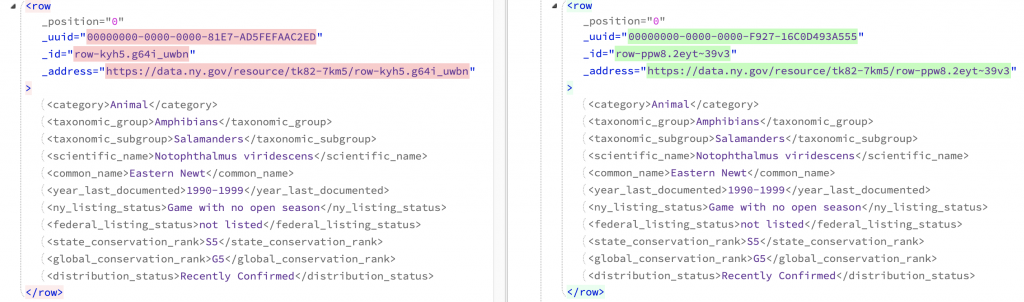
However, there is still some tidying up to do. We are not interested in the attributes so they can be ignored by adding this to the config file:
<dcf:location name="row-attributes1" xpath="//row/@_position"> <dcf:ignore-changes use="DELETE"/></dcf:location><dcf:location name="row-attributes2" xpath="//row/@_uuid"> <dcf:ignore-changes use="DELETE"/></dcf:location><dcf:location name="row-attributes3" xpath="//row/@_id"> <dcf:ignore-changes use="DELETE"/></dcf:location><dcf:location name="row-attributes4" xpath="//row/@_address"> <dcf:ignore-changes use="DELETE"/></dcf:location>
So now the row elements that match exactly are collapsed. Rows that only exist in Albany or in Yates are shown clearly:
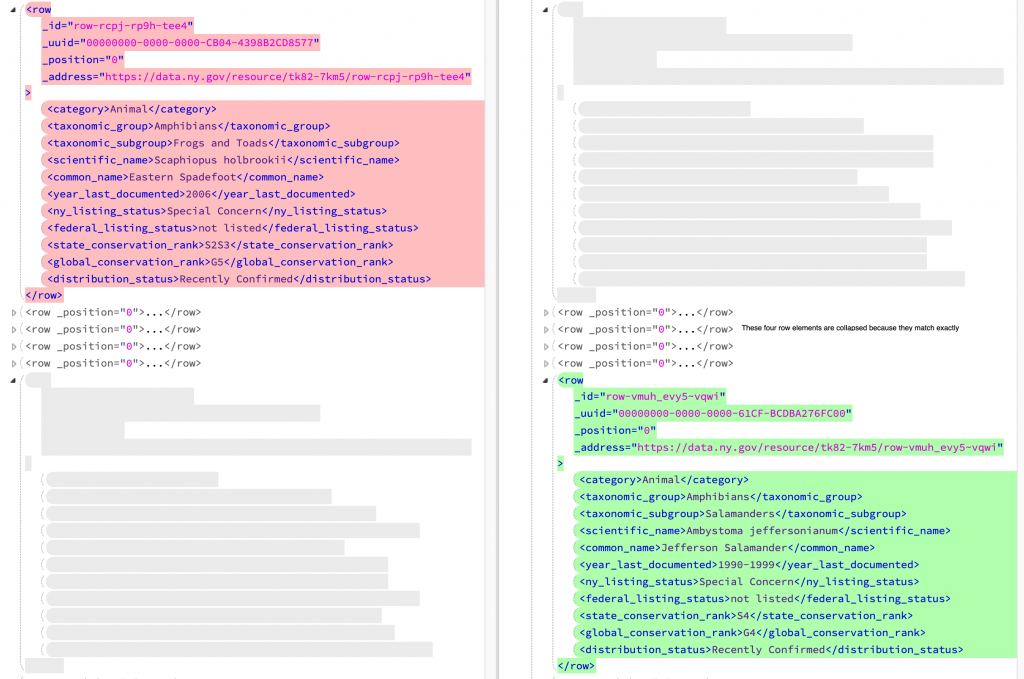
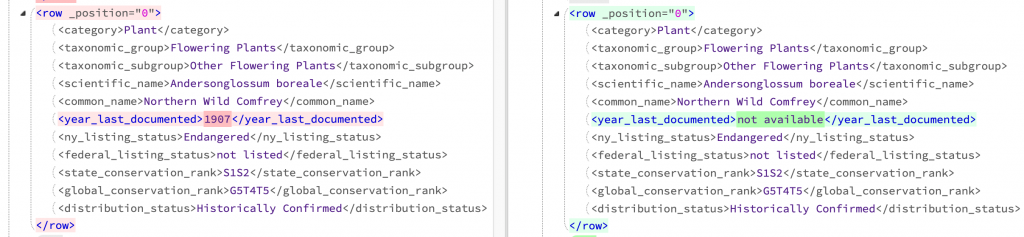
Where an animal or plant has a corresponding record in both counties but there are variations this is clearly shown as here where the year last documented is different:
The heuristic algorithm has to do a lot of work to decide on how rows align, and can’t take account of the meaning of the data. If you know what fields in the data uniquely identify each row you can add a key that clarifies what to do and speeds up the comparison.
In this case the scientific names can be used as a unique key. The extra line in the config file specifies a key as on the third line below:
<dcf:location name="keyed-on-scientific-name" xpath="//rows"> <dcf:child-order ignore-order="true" fail-if-no-key="true"> <dcf:child-alignment child-xpath="row" key-xpath="scientific_name"/> </dcf:child-order></dcf:location>
The location is the container, the rows element. Within the the elements to match are the elements and the key to use is the scientific name.
In this case, the matches are exactly the same as when just using the in-built heuristic algorithm. The speed of the comparison was a few percent faster. Specifying a key might give a more accurate match in some cases but is usually not necessary.
For more information on how to compare orderless data, you can see our Orderless Comparison guide.
There is a range of samples available on Bitbucket.






From ISO Quality Services Ltd.


