Conversion Validation Software
Trust Every Conversion with DeltaCheck
Automated validation for file and data conversions, catch differences, measure quality, and sign off with confidence.
Validate Conversions with Total Confidence
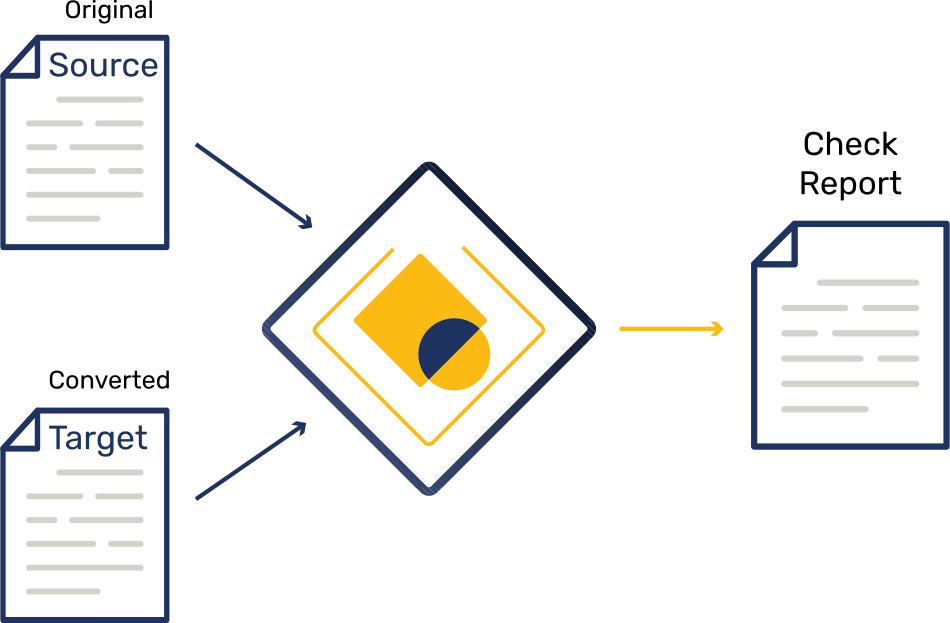
Ensure accuracy in every conversion or migration project with automated checks that flag additions, deletions, and modifications between the source and target files before anything goes live.

How does DeltaCheck fit alongside our conversion tools?
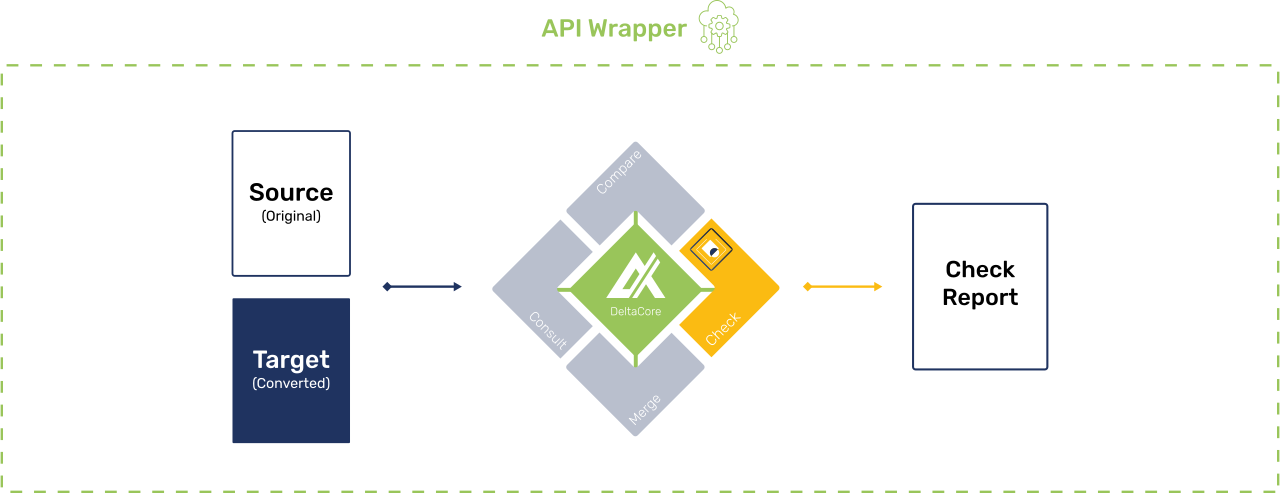
DeltaCheck works after your chosen converter, checking the output against the original to highlight differences and confirm the quality of the conversion.

What happens if changes are found?
A detailed HTML report is generated. Each change is clearly marked as an addition, deletion, or modification, with the precise content path to help you locate it quickly in your system.

Can we set tolerances so minor changes don’t fail the run?
Yes. You can ignore certain changes per element or path. If changes stay within tolerance, the run can still pass.

Does DeltaCheck work with Word conversions?
Yes. DeltaCheck validates Word document conversions as well as XML, HTML, DITA, DocBook, and many other structured or semi-structured formats.

Reduce Risk in Every Migration
DeltaCheck automatically analyses your source and converted files and highlights every difference in a clear, actionable report. It removes manual checking, accelerates project timelines, and delivers audit-ready proof of accuracy for every conversion or migration.
i
i
i
i
i
i
Your Proof of Conversion Quality
DeltaCheck’s HTML report turns complex comparisons into an easy-to-read summary. Changes are grouped and labelled as additions, deletions, or modifications, each with the exact content path. At a glance you can confirm accuracy, trigger a fix, or sign off a conversion or migration with full confidence.
Meet Your DeltaCheck Report
See Exactly What Changed and Where
Quickly verify every conversion with a detailed report that highlights additions, deletions, and modifications for fast, confident sign-off.
 Pinpoint accuracy
See exactly where additions, deletions, or modifications occurred, with the precise content path for easy follow-up.
Instant insight
Key statistics and change counts at a glance help teams decide quickly whether to approve or re-run.
Rule-based validation
Apply custom thresholds and ignore patterns so only meaningful differences are flagged.
Shareable & lightweight
Delivered as a single HTML file making it easy to distribute or integrate with your workflow tools.
Compare Smarter. Work Faster.

Check for Content Teams
Use DeltaCheck to automatically validate complex format changes, such as Word to DITA, XML to HTML, or DocBook updates, and deliver publication-ready files with confidence.
- Spot content differences
- Produce reports
- Shorten review and approval cycles

Check for Developers
Embed DeltaCheck into build pipelines or custom applications to validate conversions, without writing and maintaining diff scripts.
- Automate validation through REST APIs
- Retrieve machine-readable reports
- Integrate seamlessly with workflow tools

Check for Project Managers
Whether moving thousands of documents or entire repositories, DeltaCheck helps to ensure that every file arrives intact, no surprises at go-live.
- Validate large-scale migrations
- Track and resolve issues fast
- Provide validation proof for stakeholders

Check for Regulated Industries
From legal and aviation to pharma and finance, DeltaCheck delivers the evidence needed to meet strict industry standards and protect sensitive information.
- Meet regulatory and audit requirements
- Maintain a trusted version history
- Safeguard confidential or personal data

The Last Step to a Perfect Conversion
Whether you manage technical documents, regulated content, large-scale data, or one-off migration projects, DeltaCheck delivers the certainty and speed traditional QA can’t match. It provides independent, automated checking that protects content integrity, saves time, and ensures every file is accurate before release.

Independent Validation
Provides an objective check on every conversion or migration, separate from the tools that perform the conversion.

Fast Sign-off
Clear, actionable reports let teams review and approve changes quickly, keeping projects on schedule.

Complete Traceability
Every change is categorised and recorded with its exact content path, so you can track and prove what was modified and where.

Seamless Integration
API-first design fits smoothly into CI/CD pipelines, CMS platforms, and custom workflows.

Accurate Difference Detection
Flags every addition, deletion, and modification between source and target files.

Broad Format Support
Works with Word, XML, HTML, DITA, DocBook and other structured or semi-structured formats.

Enterprise-Scale Performance
Handles large files and high volumes reliably for even the biggest projects.

Audit-Ready Evidence
Produces detailed HTML reports suitable for compliance and regulatory needs.

Lower Risk and Cost
Reduces manual checking and prevents costly rework by catching issues early.
Multi-Format Support
Validate conversions across a wide range of formats without switching tools. Whether you’re replatforming a DITA repository, publishing DocBook to multiple outputs, or migrating Word manuals into XML, DeltaCheck has you covered.
Microsoft Word
Validate conversions to or from Microsoft Word, ensuring all content remains accurate and intact.
XML
Check complex XML-based content, from technical documentation to structured data.
HTML
Confirm that web-ready outputs preserve content, whether publishing to websites, portals, or online help systems.
DITA
Protect topic-based content and ensure that elements and metadata survive transformation between authoring and publishing stages.
DocBook
Verify book or article-style technical documentation through every conversion, maintaining correct structure and cross-references.

Check, Compare, Merge, Consult
From validating conversions to tracking changes and merging edits, DeltaXignia’s comparison solutions support every stage of your content and data workflows.

DeltaCompare
Precise Document & Data Comparison
Identify, review, and share every change between two or more document versions.
For teams that need to see and manage changes between two or more document versions, DeltaCompare delivers highly accurate comparisons across formats like XML, HTML and DITA.
✓ Highlight additions, deletions, and modifications with precision.
✓ Produce redlined outputs for editors or downstream systems.
✓ Integrate with CMS or content management pipelines.

DeltaMerge
Smart Merging for Complex Documents
Bring multiple edits or branches together into one accurate, conflict-free document.
When multiple authors or branches create parallel changes, or when edits are made sequentially over time, DeltaMerge makes it easy to bring all contributions together into a single, consistent file.
✓ Merge 3+ versions into one trusted output ready for use.
✓ Auto-resolve conflicts with rules you control.
✓ Keep every valid change without breaking structure.

Consult
Expert Setup & Optimisation
Get tailored help to plan, configure, and fine-tune DeltaXignia solutions.
Partner with the team behind the technology to plan, configure, and fine-tune DeltaXignia solutions so they perform flawlessly in your environment.
✓ Design and set up tailored pipelines.
✓ Optimise how Check, Compare, and Merge fit into your processes.
✓ Fine-tune your setup for faster, more reliable results at scale.

Training
Build In-House Expertise
Equip your team with the skills and knowledge to integrate and configure DeltaXignia.
Equip your technical and content teams with the knowledge and confidence to get the most from every DeltaXignia solutions.
✓ Master the DeltaXignia essentials.
✓ Gain deep understanding of our APIs and configuration languages.
✓ Learn to write and maintain custom configuration code.
✓ Stay up to date as features and best practices evolve.
Frequently Asked Questions
What is DeltaCheck?
DeltaCheck is an automated validation solution from DeltaXignia used to verify accuracy during content or data migration projects. It ensures that every file transferred between systems, formats, or versions is identical in meaning and structure before sign-off.
How is DeltaCheck different from DeltaCompare?
DeltaCompare highlights and reports changes, while DeltaCheck validates that a migration or conversion has been completed correctly. It confirms that no data has been lost or altered in the process.
What types of files and data can DeltaCheck validate?
DeltaCheck supports structured formats such as XML, JSON, DITA, DocBook, and S1000D, as well as Microsoft Word (DOCX). It’s ideal for verifying large document migrations, format conversions, and data transfers.
How does DeltaCheck help with migration accuracy and compliance?
DeltaCheck compares the pre- and post-migration content to detect even the smallest differences. It produces clear validation reports that demonstrate accuracy and traceability, supporting regulatory and quality assurance requirements.
Can DeltaCheck be integrated into automated workflows?
Yes. DeltaCheck can be integrated into migration pipelines, CI/CD processes, or content management systems via APIs or command-line tools, enabling fully automated pre-release validation and compliance checking.